WordPress 2.7 Comment Style Starters:
- WordPress 2.7 Comment Style Starter #1
- WordPress 2.7 Comment Style Starter #2
- Stylizing Threaded/Nested Comments in WordPress 2.7
 In case you missed the first post related to WordPress 2.7 comments, please check it out.
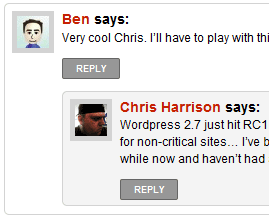
As promised here’s some starter CSS for stylizing comments in your WordPress 2.7-compatible theme. I hope to release a few more over the coming days that can be added to existing themes pretty easily. You can see this in action here on the site. This “style starter” will give parent comments and their children rounded corners. (Browsers that don’t support border-radius (or -moz-border-radius or -webkit-border-radius) won’t see rounded corners.) This has been tested in Firefox 3.0.4, Internet Explorer 7, Opera 9.6 and Safari 3.1. It may require some tweaking to get it to fit properly into your theme.
[sourcecode language=’css’]
ol.commentlist { list-style:none; margin:0; padding:0; text-indent:0; }
ol.commentlist li { border:1px solid #d5d5d5; border-radius:5px; -moz-border-radius:5px; -webkit-border-radius:5px; height:1%; margin:0 0 10px; padding:5px 7px 5px 57px; position:relative; }
ol.commentlist li.alt { }
ol.commentlist li.bypostauthor {}
ol.commentlist li.byuser {}
ol.commentlist li.comment-author-admin {}
ol.commentlist li.comment { }
ol.commentlist li div.comment-author { padding:0 170px 0 0; }
ol.commentlist li div.vcard { font:bold 14px/1.4 helvetica,arial,sans-serif; }
ol.commentlist li div.vcard cite.fn { font-style:normal; }
ol.commentlist li div.vcard cite.fn a.url { color:#c00; text-decoration:none; }
ol.commentlist li div.vcard cite.fn a.url:hover { color:#000; }
ol.commentlist li div.vcard img.avatar { border:5px solid #d5d5d5; left:7px; position:absolute; top:7px; }
ol.commentlist li div.vcard img.avatar-32 {}
ol.commentlist li div.vcard img.photo {}
ol.commentlist li div.vcard span.says {}
ol.commentlist li div.commentmetadata {}
ol.commentlist li div.comment-meta { font:bold 10px/1.4 helvetica,arial,sans-serif; position:absolute; right:10px; text-align:right; top:5px; }
ol.commentlist li div.comment-meta a { color:#333; text-decoration:none; }
ol.commentlist li div.comment-meta a:hover { color:#000; }
ol.commentlist li p { font:normal 12px/1.4 helvetica,arial,sans-serif; margin:0 0 1em; }
ol.commentlist li ul { font:normal 12px/1.4 helvetica,arial,sans-serif; list-style:square; margin:0 0 1em; padding:0; text-indent:0; }
ol.commentlist li div.reply { background:#999; border:1px solid #666; border-radius:2px; -moz-border-radius:2px; -webkit-border-radius:2px; color:#fff; font:bold 9px/1 helvetica,arial,sans-serif; padding:5px 10px; text-align:center; width:36px; }
ol.commentlist li div.reply:hover { background:#c30; border:1px solid #c00; }
ol.commentlist li div.reply a { color:#fff; text-decoration:none; text-transform:uppercase; }
ol.commentlist li ul.children { list-style:none; margin:1em 0 0; text-indent:0; }
ol.commentlist li ul.children li { }
ol.commentlist li ul.children li.alt {}
ol.commentlist li ul.children li.bypostauthor {}
ol.commentlist li ul.children li.byuser {}
ol.commentlist li ul.children li.comment {}
ol.commentlist li ul.children li.comment-author-admin {}
ol.commentlist li ul.children li.depth-2 { margin:0 0 .25em; }
ol.commentlist li ul.children li.depth-3 { margin:0 0 .25em; }
ol.commentlist li ul.children li.depth-4 { margin:0 0 .25em; }
ol.commentlist li ul.children li.depth-5 {}
ol.commentlist li ul.children li.odd {}
ol.commentlist li.even { background:#fff; }
ol.commentlist li.odd { background:#f6f6f6; }
ol.commentlist li.parent { }
ol.commentlist li.pingback { }
ol.commentlist li.pingback.parent { }
ol.commentlist li.pingback div.vcard { padding:0 170px 0 0; }
ol.commentlist li.thread-alt { }
ol.commentlist li.thread-even {}
ol.commentlist li.thread-odd {}
[/sourcecode]
WordPress 2.7 Comment Style Starters:
Comments
34 responses to “WordPress 2.7 Comments – Style Starter #1”
Nice work! This should prove to be very useful to theme authors. Thanks for sharing.
My pleasure. Thank you for all you do with WordPress, Mark!
Looks cool…
But what are “#
ol.commentlist li div.vcard img.avatar-32 {}
#
ol.commentlist li div.vcard img.photo {} ” all about?
I tried to modify this but did not found their use… Any idea? ?hanks
They’re included for reference mainly. You may need to make the selectors more specific if they’re not working right or at all.
With the images, I think height and width are explicitly defined in the HTML. CSS won’t be able override that. Have patience. I’m sure someone will develop an avatar options plugin to address the issue you’re having. ;)
Can’t wait for such plugin!
I had big problem getting the image behind the avatar to display correctly. I think it has something to do with display:inline or such, but I am not very good in CSS.. Maybe you can help?
Thanks
Great work!
Actually, it is possible to override those width/height values with CSS, but you usually don’t want to do it because the image will look pixelated in most browsers. The brilliant thing about Gravatar: it serves up an image of whatever size you need, reducing load times and giving you the highest quality. I’m not sure offhand where the size setting is in the new comment function, but it is there somewhere.
Update: found it! The parameter you’re looking for is
avatar_size. So if you wanted your avatar size to be 75px (for example), you would use the function this way:wp_list_comments('avatar_size=70'). There are more parameters listed in this thread on wordpress.org. Hopefully we’ll get full documentation soon.Very cool :) Thanks for posting that.
Typo: The size param was meant to be 75px in both places. E.g. if you wanted 50px the param would be
avatar_size=50.What plugin do you use to display the code like that in your post?
I use SyntaxHighlighter Plus.
Thanks for this great tutorials… You can check my blog to see my comment section ;)
It looks GREAT! I like the little touch you added to the Gravatar making them look like a speech balloon. Very nicely done!
I just checked my site in IE 6.0. For some reason all the comments in the ordered list are intem number one. Looks like IE 6.0 is interpreting this as a large amount of ordered lists with one item in each. Why is that?
I’d generally prefer not numbering the comments, but I can’t see how. Tried messing with comments.php, but changing
ol class=”commentlist”
to
ul class=”commentlist”
just messes up everything. :-(
But they aren’t numbered on your site. Must be something with my theme.
I finally did get rid of the numbering, I just needed
ol.commentlist { list-style:none }
in the stylesheet.
But now I am wondering why IE 6 shows the first comment narrower than the others.
I’m not seeing that issue when I view your site in IE6. (Specifically, I was looking here: Krigiskt helgon vann över Stalin). If you can send me a screenshot via email (chris@cdharrison) to see what’s going on… It’s possible that it’s caused by not having
text-indent:0;as an attribute forol.commentlist… but I’m not certain. If you continue having issues, let me know.Yes, you are right, the issue is gone. Must have been some caching issue.
Now I only have two other IE 6 issues, the search box showing too low and too large headings for exceprts in the sidebar…
Thanks for the great tutorial!
Glad to be of assistance! :)
[…] WordPress 2.7 Comment Style Starter #1 […]
Do these comments use ajax?
They do. They’re using a built-in WordPress function –
wp_enqueue_script('comment-reply'):[code][/code]
You can find more information on it here: WordPress 2.7 Comments Enhancements
Thank you very much. Great style…
Now that I changed it to a larger Gravar size how do I make it fit into the LI?
Easiest way would probably to make sure floats on
ol.commentlist liare cleared properly (clear:both;) and more padding is added to the left-margin to accomodate the larger avatar.Your new selector might look like this:
ol.commentlist li { border:1px solid #d5d5d5; border-radius:5px; -moz-border-radius:5px; -webkit-border-radius:5px; clear:both; height:1%; margin:0 0 10px; padding:5px 7px 5px 97px; position:relative; }Hi Chris – Thanks for your great tutorials. I have a question about styling author comments. I have my comments in a different color than all other comments. I use this
ul.commentlist li.bypostauthor {background: #def6d8 url(http://kimwoodbridge.com/wp-content/themes/kimwoodbridge/images/comment-bg.gif) repeat-x !important;}
When I reply to someone and then someone replies to my reply, their comment is green rather than the white that it should be. I’m not sure which style I should use so this doesn’t happen – would it be one of the children or do I need to specify something for ol.commentlist li.byuser {} ?
Thanks for your help!
Hi Chris, I am working on getting this working. I added the style to my css file and it’s working but for some reason the REPLY button doesn’t say REPLY and is not clickable. Is this something to do with my comments.php file? I copy/pasted the comments.php file from the default theme folder when I downloaded wordpress 2.7.1 and thought that would work. Am I missing something?
Thanks,
Mike
Sorry about that – I didn’t realize you had to activate the nested comments in the wordpress admin panel. I fixed it and it’s working great now. Thank you so much for this!
no worries :) I’m glad you got it working and found this useful.
Thanks for this!
I’m glad you found it useful!
Great tutorial man, thx!
Chris, thank you so much, this was extremely helpful! I was starting to really dislike threaded comments, they looked so messy. Now I am giving them another chance, thanks to you. They look so much better with your style starter!
cdharrison.com » archive » WordPress 2.7 Comments – Style Starter #1…
This is the personal site/blog/experiment of Chris Harrison, a web designer living, working and playing in Augusta, GA….